A calm baby sleep tracker for everyday routines
Log naps and night sleep in one place — without advice or pressure.
Scoopy Log is a simple sleep log for parents. Track when your baby sleeps, see the day at a glance, and keep records for yourself or for appointments. It does not provide medical advice or diagnosis.
Why parents use it
Parents use a baby sleep tracker to stay clear on the day: when the last nap was, how long overnight sleep was, and whether the pattern is easy to review. Scoopy Log is built for that clarity. You get a simple log you control — no goals, no predictions, no expert advice. Just a calm record you can trust.
Track sleep with less friction
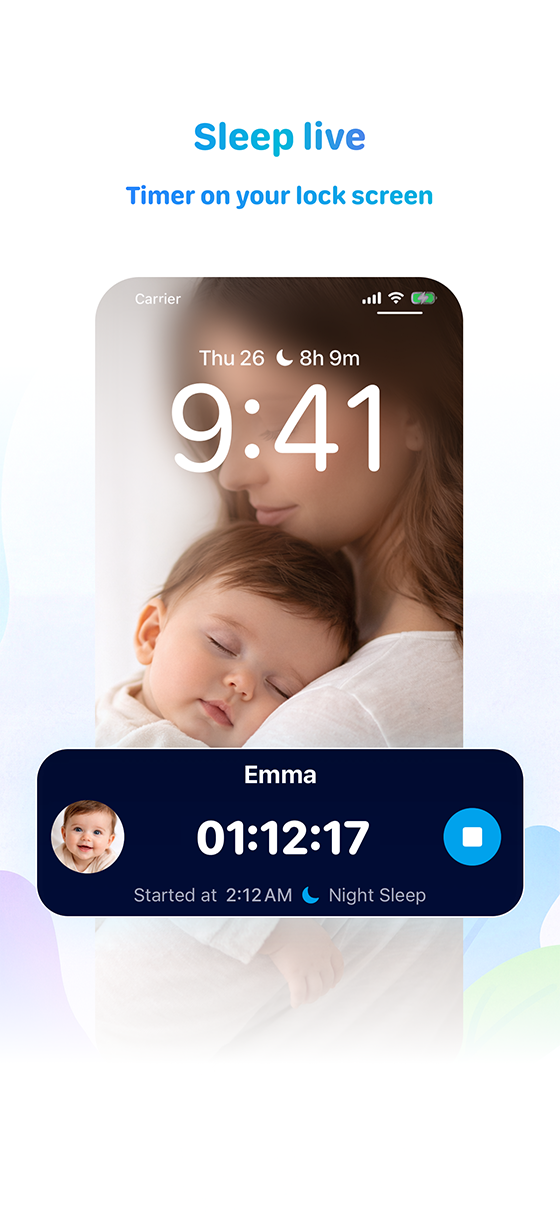
Logging sleep should be quick, especially at night. In Scoopy Log you can start a sleep timer from your Lock Screen so you can see duration without unlocking your phone. Add naps and overnight sleep with one tap. Home and Lock Screen widgets show today’s log at a glance, so you’re not digging through menus.
See patterns more clearly
Review the day or the week in one place. See when sleep happened and how long it lasted. No algorithms or recommendations — just a clear overview so you can spot routines that work for your family.
Export reports when needed
When you need a record for a visit or for yourself, you can export a clean PDF. The free tier includes a summary; Premium adds the full Captain’s Log with detailed daily logs and statistics. Scoopy Log does not provide medical advice; the export is for your own reference.
Start your sleep log
Download Scoopy Log on the App Store. No account required to start logging.
Download on the App StoreCommon questions
Is this a baby sleep training app?
No. Scoopy Log is a log only. It does not give sleep advice, schedules, or training. You record what happens; the app helps you see it clearly.
Can I track naps and night sleep?
Yes. You log each sleep with one tap — naps and overnight. A timer on the Lock Screen lets you track duration without opening the app.
Does it work on the Lock Screen?
Yes. You can start and see a sleep timer on the Lock Screen. Widgets also show today’s log at a glance (Premium for Lock Screen widget).
Can I export my sleep data?
Yes. You can export a summary PDF (Free) or the full Captain’s Log PDF (Premium) for your own records or to share when needed.
Is my data private?
Yes. No ads, no tracking, no data selling. Your logs stay on your device or in your optional iCloud account. We don’t have access.